What a card payment is actually made of: the four-party rail, tokenization, the encryption that keeps card numbers off your server, why 3D Secure exists, and how money actually reaches your bank account. It also covers where the crypto lives hop by hop, and which keys and obligations are actually yours.

Every integration starts the same way. Someone opens a checkout page, types in a card number, and watches a spinner for a second and a half. Then the money turns up in a Stripe balance two days later and nobody thinks about it again.
That spinner is hiding about six different organizations passing messages along, twice, in both directions. Underneath it sits a second, slower process moving real value between banks on a multi-day cycle, which the spinner gives you no hint about.
Most payment bugs are really misunderstandings about two questions: which organization currently holds the money, and who is legally allowed to move it. Almost every strange behaviour becomes obvious once you can answer those. So this is a walk through the whole path, with emphasis on the part people find hardest to accept, which is that your server never touches the card number and never needs to.
Everything here describes card payments on Stripe’s standard integration in the US and UK. Amounts and identifiers are illustrative. Other rails such as ACH, SEPA and wallets follow the same shape with different rules.
The ten-second versionh2
Strip the detail out and a card payment is four things happening in sequence:
- The merchant creates a PaymentIntent, a server-side record saying “we intend to collect this much money.”
- The customer proves they may spend that money and the issuing bank authorizes it. This is a hold. The money has not moved.
- The merchant captures the hold, which turns it into an actual claim on the customer’s funds.
- The card network settles that claim between the two banks, and Stripe payouts your balance to your bank account.
Steps 1 and 2 take a second or two. Steps 3 and 4 take days. Most confusion in payments comes from expecting step 4 to be as fast as step 1, or from treating the hold in step 2 as money that already arrived.
There is a fifth thing that is not a payment step at all: the webhook. Stripe tells your server what happened by sending it a signed HTTP request. If you build a checkout that waits for that request before confirming the order, you will get it right. If you build one that polls the API, you will eventually get it right, expensively.
Who is actually involvedh2
Six parties, and they are easy to mix up because several of them are “the bank” in casual speech.
| Party | What it is | What it does in this flow |
|---|---|---|
| Customer | The person paying you | Enters card details, does 3D Secure if asked |
| Merchant | You | Creates the PaymentIntent, captures it, gets paid out |
| Stripe | The payment processor | Runs the checkout page, tokenizes, talks to the banks, keeps a ledger, sends you webhooks |
| Card network | Visa, Mastercard, American Express | Moves the authorization and settlement messages between banks, enforces the rules |
| Issuing bank | The customer’s bank | Decides whether to authorize, and is where the money comes from |
| Acquiring bank | The merchant’s bank, usually a partner of Stripe’s | Provides the merchant account that receives the settlement |
The last two are the pair people miss. The issuing bank is the one that says yes or no, and the one that ends up short of money. The acquiring bank is the one the network pays, and the one that sends the money to you.
Stripe is not a bank in the US. It holds your merchant balance and moves it to your account, but the card processing itself runs through chartered banking partners. That is why you see names like Evolve Bank or Goldman Sachs in Stripe’s disclosures even though you signed up with Stripe. In the UK and EU, Stripe’s relevant entity is a licensed payments institution, usually Stripe Payments UK or its Irish entity, which changes some of the regulatory detail but not the flow.
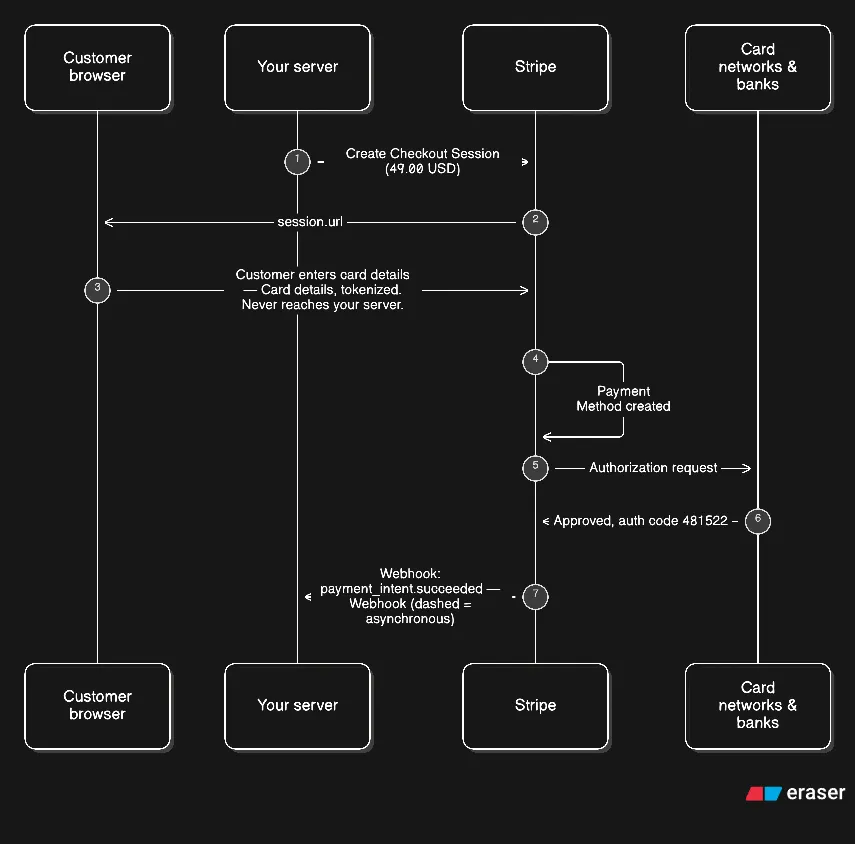
The whole trip in one pictureh2
Here is everything in a single view. Do not worry about reading it now, it is a reference for the sections that follow.
What the card rails actually areh2
Before anything else, the awkward fact worth sitting with: your customer and you are both customers of banks, and you are not connected. There is no line from their account to yours.
What exists instead is a four-party rail, and it has looked roughly like this since the 1960s:
- Your customer’s bank issues the card. It opened the account, it set the credit limit, it is the one that ends up out of pocket if the payment goes wrong.
- Visa or Mastercard operates the network between banks. It carries messages, and it enforces the rules the member banks agreed to.
- Stripe holds an acquiring relationship, so your side of the transaction has a bank that can talk to the network.
- The issuing bank and the acquirer settle with each other directly, on a separate schedule, without Stripe or you in the loop.
That fourth point is the one that surprises people. The money does not travel through Stripe and it does not travel through the network in any physical sense. The network moves messages, and the banks move money to each other afterwards, on a delay. The authorization you see complete in 900 milliseconds and the settlement that follows three days later are two entirely separate processes that happen to be about the same transaction.
The practical consequence is that “the payment succeeded” is genuinely ambiguous as a phrase, and you have to say which one you mean. succeeded on a PaymentIntent means a bank said yes. The money being in your bank account is a different event, days later, with its own object in Stripe’s API.
There is one more piece to this rail that is newer and worth knowing about. Apple Pay and Google Pay do not send your customer’s actual card number to the merchant. The phone or browser asks the network to provision a network token: a device-specific replacement PAN, cryptographically bound to that device, that only works in that device’s wallet. The raw number never leaves the customer’s bank. For a large and growing share of payments, the card number genuinely never exists on the merchant side of the transaction, not even for a moment.
The encryption and the token, which is the whole security storyh2
Here is the part that changes how you build things.
There is cryptographic machinery on this page, but it is modest and it is all standard. Four facts cover essentially everything:
- The card number travels from the browser to Stripe over ordinary TLS.
- Stripe replaces the number with a token at the first opportunity, and from then on your part of the stack never sees a number at all.
- Whatever plaintext card data Stripe has to keep goes into a PCI-compliant vault, encrypted at rest, with access restricted and logged.
- When Stripe talks back to you it signs its messages, most visibly the webhooks, so a forged message is detectable without any decryption on your side.
If you take one mental model away, make it this: encryption protects the number while it is moving and while it is stored. Tokenization is what keeps the number out of your systems entirely, and that is stronger than any amount of encryption you could run yourself.
The card number goes from the browser directly to Stripe. Not to your server, not through your server, not near your server. Your page loads Stripe’s JavaScript, that JavaScript talks to api.stripe.com over TLS, and the card details go into that connection. Your backend is not in the path. It cannot be, because it was never given anything to be in the path with.
The encryption on that hop is ordinary TLS, currently TLS 1.2 or better with modern cipher suites, and TLS 1.3 where both ends support it, the same protection you get when you load any HTTPS page. The reason people are surprised is not that the encryption is exotic. It is that the destination is Stripe rather than them, and the whole point of using Stripe’s components instead of building a form is that you are removed from the path entirely.
The plaintext has exactly two homes in the whole journey. One is the browser tab, in the memory Stripe’s JavaScript controls, between the customer typing and the request leaving. The other is inside Stripe, briefly, while the request creates the payment method. Nothing in between holds it, and your server is not in either list. A number that never reaches you cannot be leaked from your database, skimmed by your frontend, or captured in your logs. Encryption never gives you that. Omission does, and tokenization is the omission.
At Stripe’s edge the TLS connection ends, and from then on the number is inside Stripe’s network. Stripe does not publish the full internal security model, but its engineering material does say that traffic between its own services is itself encrypted and identity-checked with mutual TLS, so the number does not come back to plaintext and stay plaintext for its service to service journey. There is a useful limit to how much detail you can get about the inside, and you should not treat that as a gap. The boundary you can inspect, the browser to Stripe edge, is the boundary that protects you, and it runs on a technology you already trust.
Then the number becomes a token. The card number is exchanged for an opaque reference, something like pm_1PxYz..., which is meaningless outside Stripe’s systems. The mapping from number to token lives in Stripe’s PCI-compliant vault, not in your database. Your server receives the token, and the token is what it stores, attaches to a customer, and passes back on future charges.
Notice that tokenization is not encryption. Encryption is reversible by design; the decryptor exists and it is the point. A token cannot be reversed, because the number was never encoded in it. There is no algorithm that turns pm_1PxYz... back into a PAN. The reference only has meaning inside the vault, behind Stripe’s PCI controls.
Three things follow from that, and they are the practical payoff:
- Your database, if breached tomorrow, contains no card numbers. There is nothing to steal, because you never received them.
- Your logs, your APM, your error tracker and your analytics all stay clean, because the number was never a value in your system to be logged. A stack trace cannot leak what was never in the trace.
- Your PCI DSS obligation collapses from the largest questionnaire to the smallest. See below.
What Stripe keeps. This is worth being precise about, because “Stripe stores your card details” is true and alarming and also, on its own, misleading. To charge the same card again next month, Stripe has to be able to recognize it. It does that without keeping the number in retrievable form. What it retains is a licence to store: a hash it can match against a future number, plus the network token where one is available. A new charge works because the fingerprint matches, not because the number was filed away. Stripe stores raw PANs in specific cases where a feature genuinely requires re-charging, and it tells you when that is the case.
The fingerprint is a hash, not an encryption. Every PaymentMethod carries a card.fingerprint like fp_0aB2cD3eF4gH5iJ6:
{ "card": { "brand": "visa", "last4": "4242", "fingerprint": "fp_0aB2cD3eF4gH5iJ6" }}The fingerprint is derived from the PAN in a one way direction. Two cards with the same number produce the same fingerprint, which is exactly what you want for spotting a reused card or blocking a fraud pattern, and no amount of computation turns it back into the number. Encryption would be the wrong tool here, because you would always be tempted to decrypt it, and you must never be able to.
How your data is protected inside Stripe. Card data at rest is encrypted with AES-256, the cipher Stripe names in its public material, access is restricted to staff who need it and is logged, and Stripe holds PCI DSS Level 1 certification as a service provider. Exactly how the AES keys are layered is not public, which is normal for a payment processor; that hierarchy lives in hardware security modules. That certification is not a substitute for your own obligation, because your obligation is about your own environment, but it is what lets you avoid auditing the card path you never built.
What you have to do about PCI. The Payment Card Industry defines four self-assessment questionnaires, and which one applies to you is decided by how much of the cardholder data path you built:
| Questionnaire | Applies when | Roughly what you answer |
|---|---|---|
| SAQ A | You host nothing. Stripe’s hosted Checkout page collects the card | A short confirmation, mostly that you delegate |
| SAQ A-EP | You host the page, but Stripe’s JavaScript collects the card | More questions, since the page is yours |
| SAQ D | You build the form and the card number reaches your infrastructure | Several hundred questions, the full standard |
SAQ A and SAQ A-EP are short and mostly confirm that you delegated the sensitive step. SAQ D is the one that gives everyone nightmares, and the entire strategic argument for using Stripe’s components is that it keeps you out of it. This is the pre-Stripe world: raw card numbers transiting your own web server is why every online store in the 2000s faced a full audit.
The keys you will actually seeh2
Through an integration you handle four kinds of keys, and only one of them is secret:
- Publishable key (
pk_...) lives in your frontend. It is public by design. It identifies your account to Stripe’s JavaScript and can charge nothing on its own. - Secret key (
sk_...) lives only on your server. It authenticates your API calls and can do anything, which is why it must never appear in client code, logs or public repos. - Restricted keys (
rk_...) are secret keys with a tightened permission list, for scoping what one deployment can do. - Ephemeral keys (
ek_...) are short lived, scoped to a single customer, and expire in hours, so a mobile app can talk to Stripe directly without ever holding a secret key.
The pattern behind all of them is that nothing ciphersuite related is ever in your hands. You do not choose algorithms, you do not hold the vault keys, and you never generate a key that protects card data. The only cryptographic obligation that actually lands on you is the webhook signature verification later in this post, and even that is a library call.
What your server actually receivesh2
Because the card is not in the path, the shape of a Stripe integration surprises people who arrive from building their own form. There is no endpoint of yours that receives a card number. There is no “charge” call that includes a PAN. The typical flow is:
- Your server creates a PaymentIntent or a Checkout Session describing the amount, the currency, and which methods to allow. It gets back an ID and, for Checkout, a URL.
- The browser navigates to that URL, or you mount Stripe’s component on your own page.
- The customer types the card. That goes to Stripe. Your server sees nothing.
- Your server confirms the intent and, separately, receives a webhook telling it the outcome.
The reason this shape exists is that it makes the ambiguous state explicit. A payment can be requires_payment_method, requires_confirmation, requires_action (the bank wants 3D Secure), processing, requires_capture, or one of the terminal states. The intent is the state machine, and your code is a transition function over it rather than a function that either succeeds or throws. Most integrations that handle every status explicitly are dramatically less fragile than ones that assume a single call returns a final answer.
What the browser seesh3
There are three ways to render the form, and they differ in how much of the interface is yours.
- Hosted Checkout is a Stripe page you redirect to. You control nothing visually, and you need the least code. There is no iframe and no JavaScript of yours involved in the card path at all, which is why it qualifies for the smallest PCI questionnaire.
- Embedded Checkout is the same hosted interface rendered inside an iframe on your page, so you keep your header, footer and navigation around it. The iframe boundary is what preserves the PCI argument, because the card data is still collected inside a Stripe-origin frame.
- Elements and the Payment Element give you Stripe’s individual input fields to mount inside your own markup, so you control layout and styling while Stripe still owns the data. The Payment Element is the current default: one component that renders every enabled method, so adding a wallet later is a Dashboard change rather than a frontend release.
The honest guidance is to start at the top of that list and only move down when you have a specific reason. Each step down trades real engineering work and a larger PCI scope for flexibility you probably do not need yet.
SCA and 3D Secure, and the cryptography behind the challengeh2
Strong Customer Authentication is a European regulatory requirement, in force since 2019, that says a customer’s bank must verify the customer with two factors for online payments in the EEA. 3D Secure 2.2 is the protocol that implements it. Almost every time you see a bank asking for a one-time code on a European payment, this is why.
The flow has a piece of infrastructure that confuses people, which is that the page asking for the code is not Stripe’s and not yours. The issuer runs an Access Control Server. When the authorization request reaches the issuer, the ACS evaluates it and decides between three outcomes: let it through with no customer interaction (frictionless), ask the customer to prove themselves, or refuse. If it asks, the customer lands on a page the bank owns, on the bank’s domain, with the bank’s code. Stripe relays the customer there and carries the signed result back.
The interesting part is the return trip, because it is where the security value actually is. The authentication result is cryptographically signed by the issuer’s directory server and travels back through the card network. Stripe verifies the signature. The merchant’s browser cannot forge it and your server cannot forge it, and a customer who somehow skips the challenge still cannot produce a valid authentication result. So “the customer completed 3D Secure” is a verifiable claim rather than a hopeful one, and the issuer accepts liability for the fraud dispute if the authenticated result is valid. That liability shift is the entire commercial reason banks agree to participate.
Whether the customer gets challenged at all is not entirely up to the issuer. You can ask for 3D Secure on every transaction and then request exemptions where the rules allow, and Stripe’s defaults are tuned to do a reasonable job of that for you. The low-value thresholds are exact and worth knowing: EUR 30 for a single transaction, EUR 100 cumulative since the last successful authentication, and no more than five consecutive low-value exemptions before full authentication is required.
The cumulative figure is the one that catches people out. A customer making many small purchases in one session can hit the EUR 100 ceiling and get challenged on what feels like an arbitrary purchase, which is annoying when it happens and exactly what the rule exists to prevent.
Authorization, which is a hold and not a paymenth2
Here is the bit that confuses everyone, so I will say it plainly: an authorization is not money moving. It is the issuing bank agreeing to make money available if it is eventually asked for.
When the issuer approves, it returns an authorization code, a six-digit string like 481522, and a decline code if it did not. That code is meaningless outside that one transaction. It is not a receipt and it is not proof of anything.
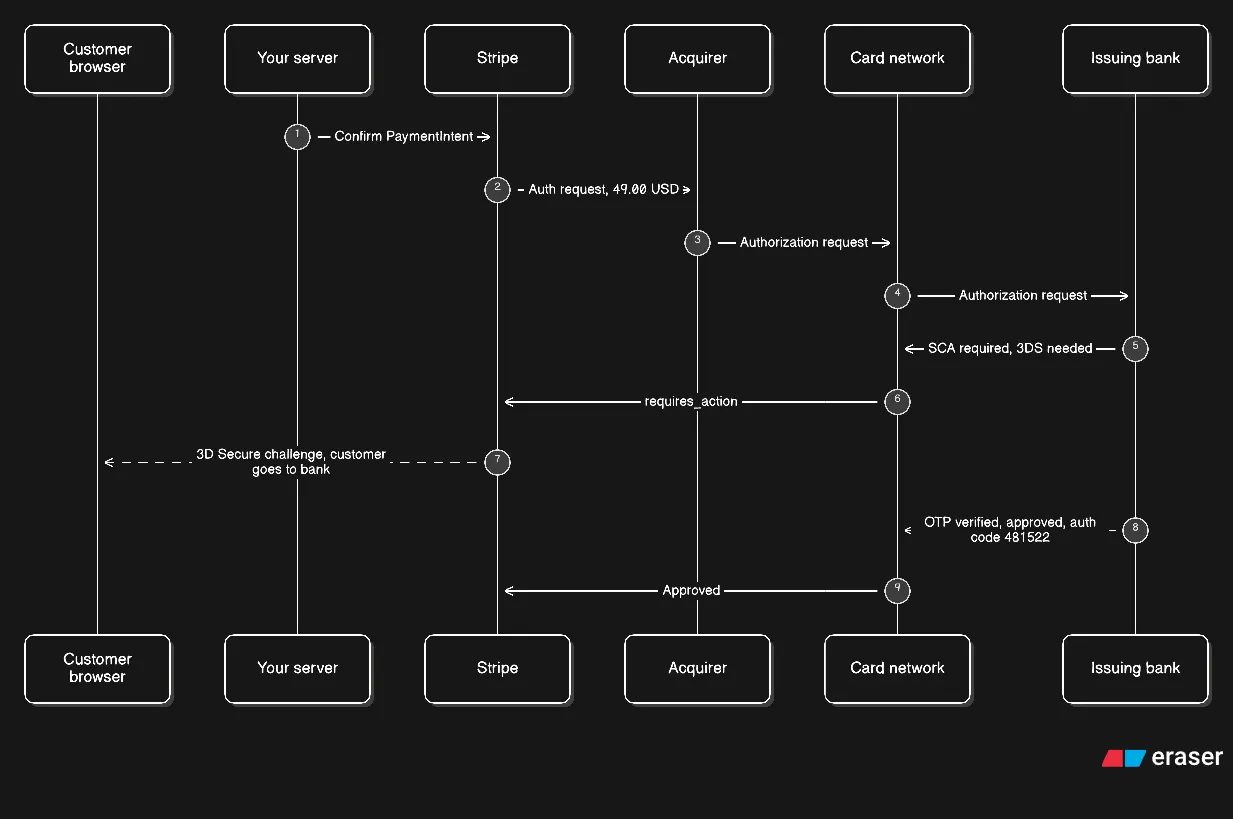
Three practical consequences of it being a hold, and all three will bite you if you have not handled them:
- The hold expires. Most authorizations are good for about seven days, some longer, and for lodging, car hire and anything else with a long fulfilment delay you need to ask the issuer to extend it. Stripe exposes this as an authorization extension on the PaymentIntent. Miss the window and the customer has to be charged again, which is a conversation you would rather not have.
- You can capture less than the authorized amount, which is how partial refunds at the point of sale work. The rest of the hold is released.
- You can occasionally capture slightly more, up to roughly 115% of the authorized amount, for the tip-on-a-restaurant-bill case. Beyond that the network rejects it.
A decline is not a single event either. A card can be declined for funds, for a stolen or lost card, for an incorrect security code, or for reasons the issuer will not disclose to the merchant. That last category is the frustrating one, and the correct response to it is never to retry aggressively, because that converts a decline into a fraud pattern.
Capture, and when it happensh2
Capture is the moment the hold becomes a claim, and Stripe lets you choose when. Automatic capture takes the money as soon as authorization succeeds, which is what you want for anything digital. Manual capture holds the authorization open and lets you capture later, which is what you want when you have to ship something before taking payment.
If you use manual capture and never capture, the hold simply expires and releases. There is no obligation to do anything, which is a nice property of the design.
Where the money goesh2
This is the part almost every diagram gets wrong, because almost every diagram draws a line from the customer to the merchant.
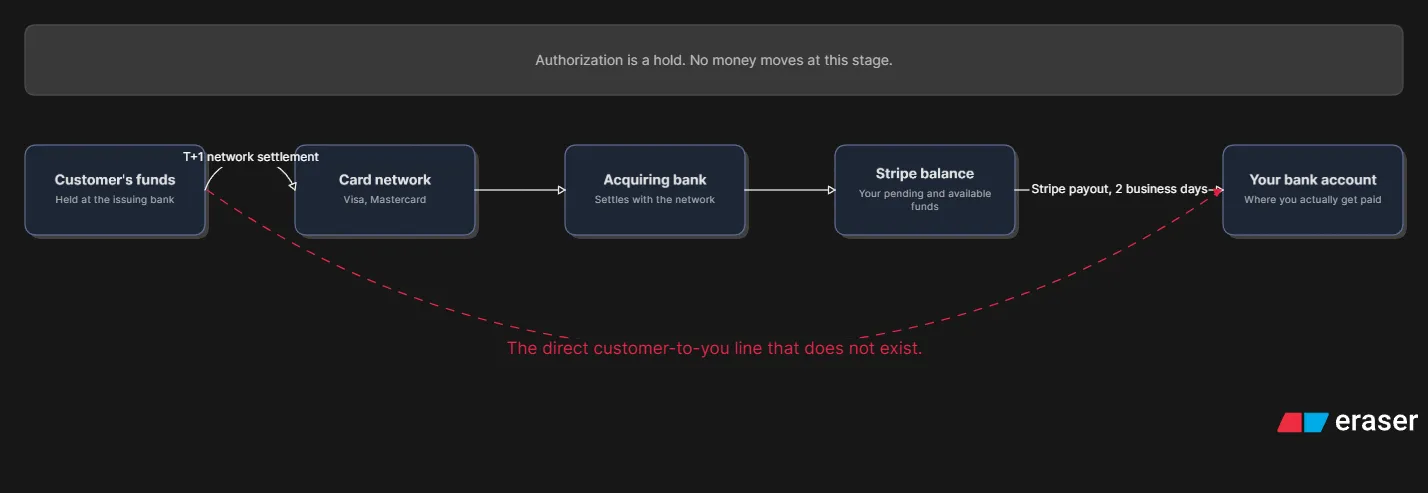
Read the diagram left to right and notice what is missing. The customer’s money is at their issuing bank. Yours is at your acquiring bank. The network moves the authorization message and the network moves the settlement message, and the money itself goes directly between the two banks, without passing through Stripe’s ledger or yours.
What Stripe’s balance is, then, is a claim on the acquiring bank. When the network settles, Stripe’s partner bank receives real money, and your Stripe balance becomes a payable amount. That is why your balance can show as available before the customer’s bank has actually parted with anything, and why the two dates do not line up.
Settlement and the payouth2
Visa and Mastercard moved US domestic settlement to T+1 during 2024, which means the issuing bank’s obligation to pay the acquirer is created the next business day. Before that it was T+2. Your customer still sees their money leave their account immediately, which is separate ledger work at their bank and has no relationship to your settlement date.
A payout is Stripe sending your balance to your bank, on a rolling daily schedule that defaults to a two-business-day cycle. The availability of funds inside Stripe and the arrival of funds in your account are two different clocks, and the Dashboard shows them as separate numbers. The balance object breaks down like this:
{ "object": "balance", "available": [{ "amount": 412840, "currency": "usd", "source_types": { "card": 412840 } }], "pending": [{ "amount": 61200, "currency": "usd", "source_types": { "card": 61200 } }], "instant_available": [{ "amount": 100000, "currency": "usd", "source_types": { "card": 100000 } }], "livemode": true, "available_on": 1774915200}All three buckets are arrays, one entry per currency, not objects keyed by currency code. That catches people out because a single-currency account is the common case and a JSON object is what most of us would reach for.
availableis money Stripe will pay out on the next scheduled payout. This is what you can spend.pendingis money from successful charges that has not finished settling. A brand new account looks odd here for a day or two after its first sale, and that is normal rather than broken.instant_availableis the subset you can pull out through Instant Payouts, at a fee. What lands in it is narrower than most people assume: card funds are included immediately, but bank debits such as ACH and SEPA only appear once they have fully settled, since they can still be reversed. Stripe also subtracts pending recovery debits, caps the total at whatever is left of your daily allowance, and pre-deducts the fee so the number is what you would actually receive. If your account is not eligible the amount is simply0.available_onis a Unix timestamp for the next payout date, and it is the single most useful field here, because it lets you answer “when will I actually see this” without guessing.
Instant Payouts cost 1.5% in the US, Australia, New Zealand and the UAE, and 1% in Canada, the UK, the euro area, Singapore, Norway, Hong Kong and Malaysia. Funds normally land in minutes and, unlike standard payouts, the service does not care about weekends, which is rather the point of it.
Weekends and bank holidays do not count as business days anywhere in this chain. A payment authorized on Thursday evening on a US card can settle on Monday and pay out on Tuesday or Wednesday.
How your server finds out: webhooksh2
If you read one section carefully, make it this one. A webhook is an HTTP POST from Stripe to a URL you register, carrying a JSON event. Because it is an HTTP request, it can fail, arrive twice, arrive out of order, and arrive while your server is restarting. All four are normal and all four will happen to you.
Verify the signature, alwaysh3
Anyone who learns your webhook URL can send you a payload claiming a customer paid a thousand pounds. Stripe signs each request to prevent that. The signature is an HMAC-SHA256 over the timestamp and the raw request body, delivered in the Stripe-Signature header as t=timestamp,v1=signature.
You must verify it against the raw body. Any re-serialisation of the JSON changes the bytes and breaks the check, which is why you need the framework’s raw body access rather than the parsed object. You should also reject timestamps older than about five minutes, since that is what stops a captured valid request being replayed later.
import Stripe from 'stripe'import express from 'express'
const stripe = new Stripe(process.env.STRIPE_SECRET_KEY)const app = express()
// The raw body parser must come before the JSON parser.app.post('/webhook', express.raw({ type: 'application/json' }), async (req, res) => {  const event = stripe.webhooks.constructEvent(req.body, req.headers['stripe-signature'], process.env.STRIPE_WEBHOOK_SECRET)
  try {    switch (event.type) {      case 'payment_intent.succeeded':        await fulfilOrder(event.data.object)        break      case 'payment_intent.payment_failed':        await notifyFailure(event.data.object)        break    }    res.sendStatus(200)  } catch (err) {    // Returning 500 makes Stripe retry, which is what you want    // if the work genuinely failed.    res.status(500).send('Webhook handler failed')  }})
Retries, ordering, and duplicatesh3
Stripe retries a delivery for about three days with exponential backoff, and delivers events at least once. That combination means you will process some events twice, and you must design for it.
Three habits cover almost all of it:
- Make your handler idempotent. Key fulfilment on the event’s
id, which is unique per delivery, and store what you have processed. Deduplicating on the intent ID alone is not enough when two different events arrive for one intent. - Do not assume ordering.
payment_intent.succeededandcharge.succeededdescribe the same payment from different angles, and either can arrive first. If your handler for one depends on the other having run, fetch the current state from the API instead of trusting what arrived. - Return 200 quickly. Do the slow work outside the request, or Stripe will time out and retry while your first attempt is still running, which is a reliable way to double-charge someone.
Idempotency keys solve the other half of the problem, which is the request side. If you send a charge to Stripe and the response is lost in a network blip, a retry creates a second charge unless you pass the same key:
// The key makes the retry safe. Stripe stores the first result// and returns it again rather than charging twice.const intent = await stripe.paymentIntents.create( { amount: 4900, currency: 'usd', // A PaymentMethod you saved against the customer earlier. payment_method: savedPaymentMethodId, confirm: true, }, { idempotencyKey: `order_${orderId}` })A key is valid for 24 hours, and it is scoped to your account and the operation, so derive it from your own order ID rather than a random value.
What it costsh2
US card pricing is the part most people find genuinely surprising, because the headline is not the whole number.
| Component | Typical US card cost |
|---|---|
| Domestic card | 2.9% + $0.30 |
| International card | 4.4% + $0.30 |
| Currency conversion | +1% on cross-border |
| Dispute fee | $15 per dispute |
| SEPA Direct Debit | EUR 0.35 + 1.5% of the charge amount |
| Instant Payout | 1.5% US, 1% UK and euro area |
Read the refund row carefully, because it surprises people most. Stripe does not refund the original processing fee when you refund a customer, so a fully refunded order leaves you roughly 3% down. For a low-margin business that is not a rounding error, and it is an argument for pricing shipping into the order rather than absorbing refunds as a cost of doing business.
For a rough model on a 0.30 domestic card costs you about 1.72. A dispute you lose costs the 49, so $64, or 31% of the order gone in one afternoon. That asymmetry is the reason fraud and dispute handling deserve real engineering attention rather than a support inbox.
Visa’s Dispute Monitoring Program puts a merchant in the program when it exceeds both 100 disputes and 0.9% of its monthly payment volume, measured over a rolling three-month period. It is a common number to cite and also a common one to cite wrongly: the count threshold and the percentage threshold are not alternatives.
What the cryptography does not give youh2
Closing the crypto thread with its limits, because the limits are where incidents actually come from:
- Encryption does not stop a double charge. That is idempotency keys and correct webhook handling.
- Encryption does not prove a customer owns the card. That is 3D Secure and address checks, which produce verifiable claims rather than guarantees.
- TLS does not protect you from your own logs. A mis-logged PAN on your server is game over regardless of how the connection was encrypted.
- Tokenization does not make you immune to chargebacks. It removes the card from your environment; it is not an opinion about the charge.
Failure modes worth designing forh2
The bugs that actually happen, in rough order of how often they catch people:
- The customer closes the tab mid-3D Secure. The payment stays in
requires_actionforever. You need a way to resume it when the customer comes back, and an expiry policy for the abandoned ones. - The webhook arrives before your redirect returns. Extremely common, and it breaks any code that assumes the browser is the source of truth. The webhook is; the redirect is a convenience.
- An order is fulfilled twice because you keyed on the intent rather than the event. Deduplicate on event ID.
- You treat a dispute as a refund. They are different objects with different clocks and different costs, and a dispute needs evidence submitted on a deadline.
- Currency and minor units. Stripe takes the smallest unit, so 49 dollars is
4900, and 4.90 pounds is490. Getting this wrong by a factor of 100 is the single most common integration bug. - You assume settlement is instant. A customer asking “where is my money” the day after a successful payment is a support ticket you have written yourself.
Before you go liveh2
A short list that covers most of what goes wrong:
- Handle every PaymentIntent status explicitly rather than assuming
confirm: truereturns a success. - Verify webhook signatures against the raw body and return 200 fast.
- Deduplicate on event ID and pass idempotency keys on every create.
- Register
payment_intent.succeeded,payment_intent.payment_failedandcharge.dispute.createdat minimum. - Do not put anything sensitive in your client-side code, and do not use a publishable key where a secret belongs. The publishable key is publishable.
- Decide your refund and dispute policy before you need one, including who is allowed to issue a refund and up to what amount.
- Set
automatic_payment_methodsexplicitly so the methods offered cannot change underneath you. - Check the Dashboard balance page against your own ledger weekly, because the two drifting apart is how double-charging reaches customers.
The comparison that mattersh2
If you are here from the anticheat write up in the Reversals section, the contrast is the point. The Free Fire stack hand rolls a one byte XOR stream, plants 435 decoders, and calls the result protection. Stripe goes the opposite way: ciphers a decade old, algorithms from public standards, and the real cleverness is in deciding where plaintext is allowed to exist. One of those philosophies protects a video game. The other keeps the card network running, and the difference is exactly the difference between inventing cryptography and choosing it.